bling ai
rings and earrings hold their shape on their own. a necklace doesn't. the single thing that separates a necklace shot that sells from one that doesn't is whether the chain lies the way you placed it — and chains have opinions. they kink, they bunch at the clasp, they catch light in a hard line down the middle and go dull everywhere else.
so necklace photography is really two problems stacked on each other: the lighting problem every piece has, and a styling problem that's specific to anything on a chain. get the chain right and the rest is the same warm-window setup you'd use for a ring.
what follows is how to make a necklace lie correctly, the two formats that consistently convert, and the iphone settings that keep a fine chain from disappearing.
the setup
same as everything else: clear some counter near a window, lay down a neutral surface, work six to twelve inches from the window edge.
the one addition for necklaces is a shaping tool. a chain dropped from your fingers lands in a tangle. instead, lay the necklace down and shape it deliberately with the back of a spoon, a chopstick, or just a patient fingertip — open the curve, push the clasp out of frame or tuck it cleanly behind, and make sure the pendant sits flat and face-up rather than tipped on its edge.
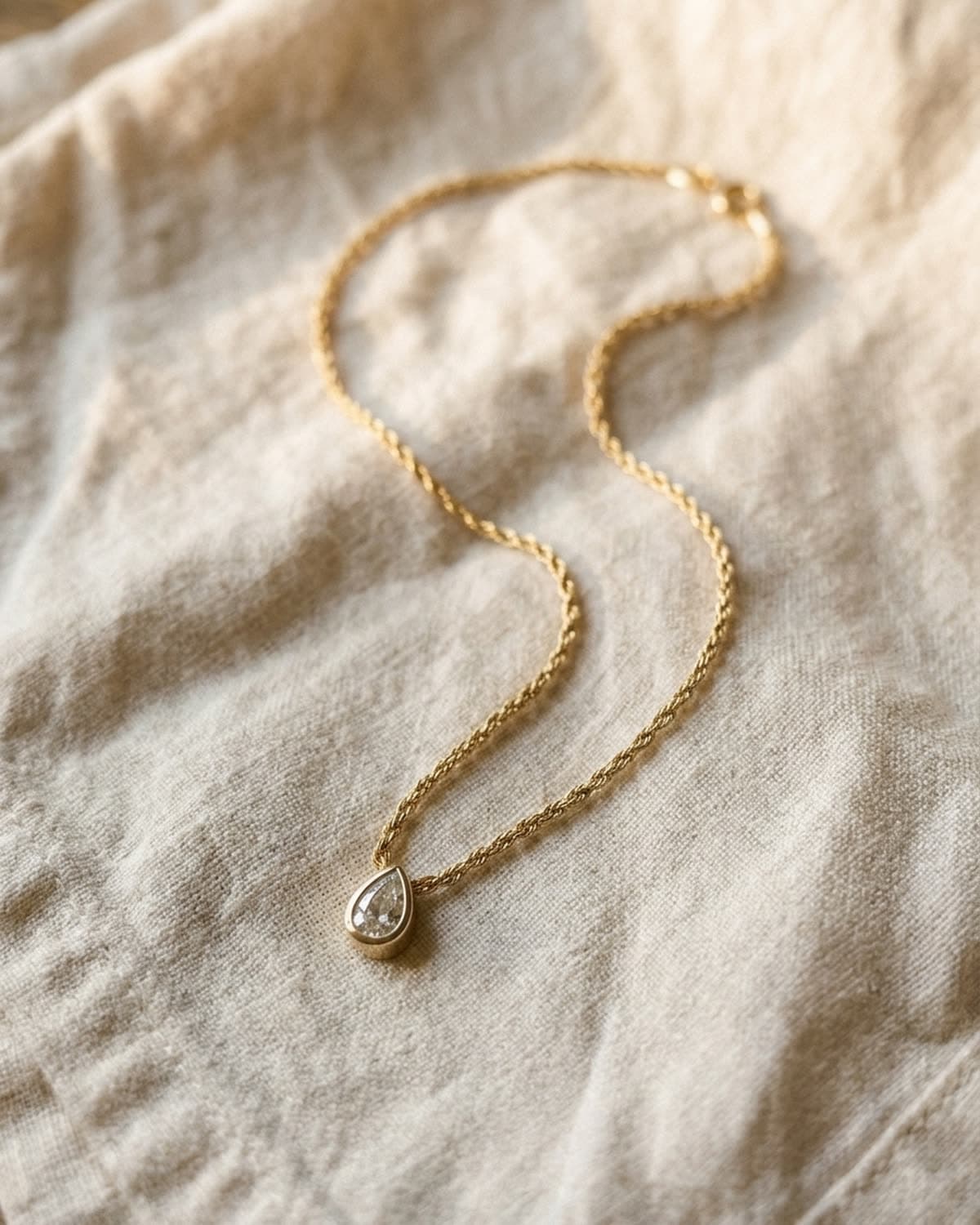
the shape that almost always works flat is a loose, open s-curve — the chain doubling back on itself once, with the pendant resting at the bottom of the lower curve. a closed circle reads like a catalog. a straight line reads like a product-page thumbnail. the s-curve reads like someone with taste set it down.
the light
direction, soft, warm, camera-left — the rule doesn't change. but a chain is more reflective per square millimetre than almost anything else you'll shoot, so two of the four classic mistakes bite harder here.
- direct sun turns a fine chain into a row of blown-out white dots and loses every link in between. diffuse it.
- flat-on phone flash produces a single hard streak of reflection straight down the chain and kills the rest. never.
what you want is the light raking across the chain at an angle, so each link catches a small highlight and the metal reads as a continuous warm line rather than a flat band. that's a side-window at a low angle doing its job. if the chain looks dull, you're too square to the light — rotate the piece (or yourself) fifteen degrees and watch it come alive.
a chain is a hundred tiny mirrors. light it from the side and it becomes jewelry. light it head-on and it becomes a zipper.
the surface
the four surfaces from our ring guide all carry over — cream linen, warm wood, oxblood silk, warm marble — and for the same reasons. two notes specific to necklaces:
silk earns its place here more than anywhere. a necklace laid on softly draped oxblood or champagne silk picks up the fabric's bounce along the whole length of the chain, and the drape of the silk echoes the drape of the chain. it's the most editorial necklace surface by a wide margin.
knit works for necklaces in a way it doesn't for rings. a chunky cream knit gives a pendant something soft and seasonal to sit in, and the texture reads warm on a collarbone-style shot. it's the one place a heavier texture helps rather than competes.


if you're shooting a layered set, graduate the lengths clearly and let each chain have its own line. layers that overlap into one mass read as a knot. a half-inch of separation between each is the difference between "stack" and "tangle."
the format
necklaces have two formats that convert, and you should shoot both for any piece you care about.
the collarbone crop. on a neck, framed from the lower lip to the top of the chest, three-quarter turn. this is the shot that sells the wearing — scale, drape, how the pendant falls. it's the hero image for a listing. you don't need a model; your own collarbone in even window light works, shot in a mirror or at arm's length, though a second pair of hands makes it easier.
the overhead s-curve. the flat-lay described above. this is the shot that sells the piece — the clasp, the chain gauge, the pendant detail, the exact length. it's the second image in a listing, the one a serious buyer zooms into.
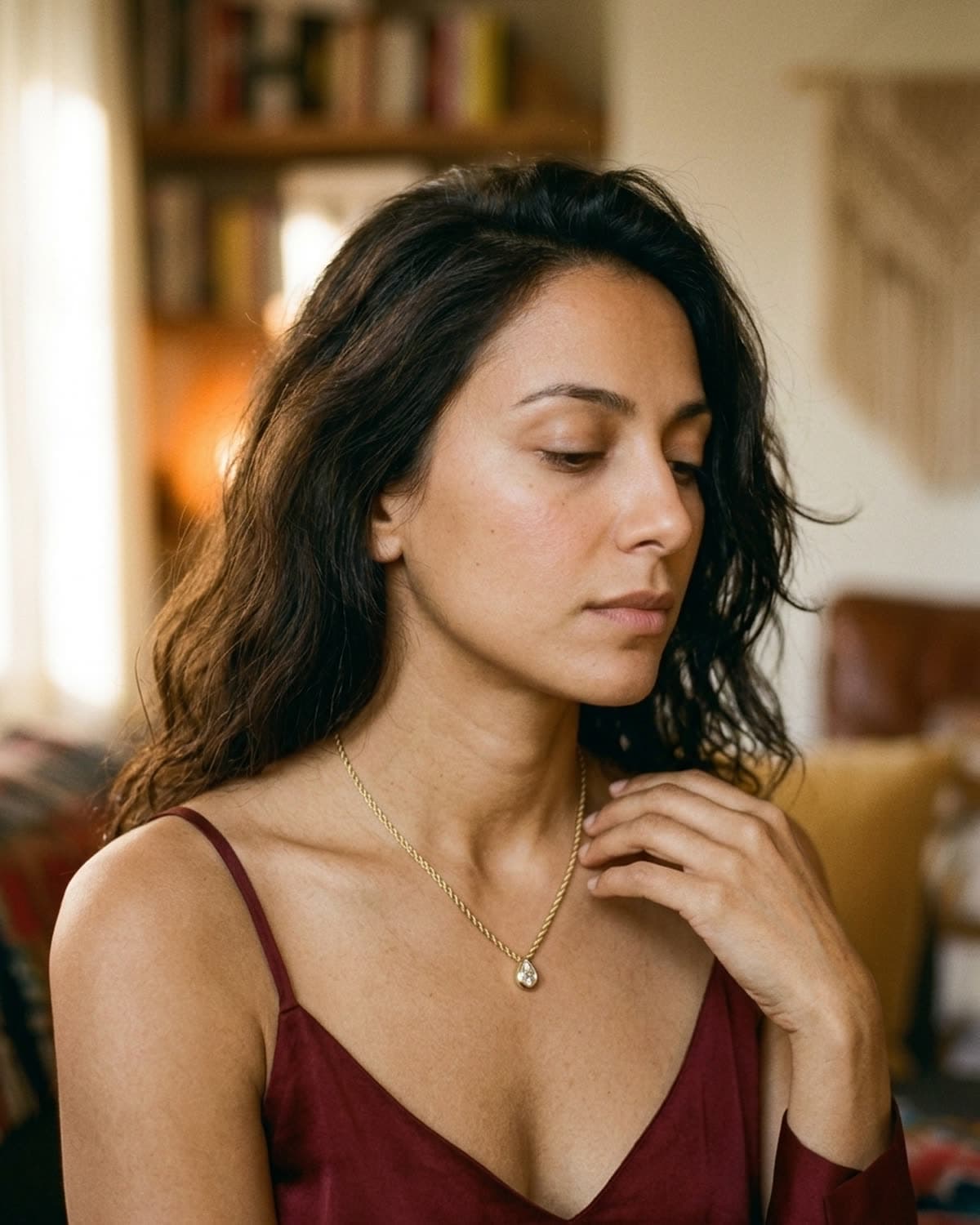
the off-center rule still applies to both. on the collarbone shot, let the pendant fall in the lower third with the turn of the neck carrying the eye down to it. on the flat-lay, weight the s-curve to one side and leave negative space opposite.
the focus
the necklace-specific iphone problem is that a fine chain sits below your phone's idea of "important detail," so autofocus hunts past it and locks on the fabric weave instead. three fixes, same hidden settings as always:
- portrait mode, with the stage light effect tapped so the phone stays in portrait for an object rather than kicking you out looking for a face.
- tap-and-hold directly on the pendant until AE/AF LOCK appears. the pendant is the one part of a necklace with enough contrast for the phone to lock on confidently; once it's locked, the chain comes along.
- drag the exposure down a notch. chains and clasps are polished metal and your phone will overexpose them indoors by default, blowing out the links. underexpose slightly and the chain holds detail.
if the chain still reads soft, you're likely below the lens's minimum focus distance — step back six inches. fine chains reward a little distance and a slight crop in over getting the phone too close.
what's working in 2026
the same shift toward single-source natural light and warm earth tones that's reshaping ring and earring photography applies here, with one necklace-specific note: the collarbone-on-skin shot has decisively replaced the bust-form and the flat white-paper drape as the editorial default. buyers want to see a necklace on a body, in real light, at real scale.
a clean iphone source matters more for necklaces than almost any other piece, because ai polishing works from your photo as a reference — and a well-shaped chain in the source comes out as a well-shaped chain. a tangled source comes out fighting itself. shape the chain, light it from the side, and whatever you do next has good data to work from.
shooting other inventory? the framing logic is different for each piece — rings lean on the off-center three-quarter, earrings on the head-to-jaw crop. same warm-window philosophy, tuned per piece.
the shortcut
if you'd rather skip the chain-shaping and the exposure math, that's what bling ai does. upload one iphone photo of the necklace — even a quick flat one — pick a scene, and get a campaign-ready collarbone shot and a clean flat-lay in under a minute. you keep the rights and can use them commercially.
start creating for free in your browser, or get the iphone app. 100 free credits, no card needed. or browse the showcase to see how necklaces polish across surfaces, every shot from a single iphone source.