bling ai
earring photography is harder than ring photography because earrings live on a face, not a surface. you can't just lay them on cream linen and call it done. the camera needs a model, the model has hair, the hair gets in the way, and the ear sits at an angle that requires deliberate light to read.
the good news: once you get the four variables right — the angle, the hair, the light, and the focus — earring photography becomes routine. you don't need a studio. you don't need a model in the professional sense — most jewelers shoot themselves or a friend. what you need is the same window-plus-neutral-surface setup that works for rings, applied to a person instead of a counter.
here's how it works.
the setup
clear a chair near a window. that's it.
the chair should be roughly six to eight feet from the window — close enough that the light is bright and directional, far enough that you have room to shoot from a couple of feet away. avoid windows that get direct sun at the time you're shooting; direct sun produces hard shadow on the face, which competes with the earring for attention. soft, diffused, directional light is what you want — north-facing windows are best, east-facing in the morning, west-facing in the afternoon, south-facing diffused through a sheer curtain.
put a neutral, non-distracting backdrop a foot or two behind the chair — a cream wall, a soft beige drape, a folded oxblood silk blouse pinned to the wall. the backdrop should match the warm-earthy palette of the rest of your shop: cream, taupe, mocha, oxblood, soft brown. avoid bright white walls, busy patterns, and anything cool-toned.
if you're shooting yourself, set the camera on a tripod or prop your phone against a stack of books at the height of your jawline. if you're shooting someone else, hold the phone six to ten inches from their ear at the height described in the angles section below.
the hair
this is the variable that separates good earring shots from bad ones. earrings live in front of, behind, and through hair. the hair has to be managed deliberately or it will hide the piece.
three options that work, ranked roughly by ease and how editorial each reads:
- hair tucked behind the ear, full reveal — the safest option. tuck the hair behind the ear with a hand, leave the rest natural. the entire earring is visible. works for every earring type.
- hand pulling hair back into a soft ponytail-adjacent gesture — looks intentional and editorial; reveals the ear without the “catalog” feel of a fully tied-back style.
- hair partially covering the earring — only works for statement earrings (large, sculptural pieces) where partial occlusion creates intrigue. for delicate studs and small hoops, this hides the piece entirely. don't do it for fine jewelry.
the option that almost never works:
- hair tied tightly back in a bun or pony — the styling reads bridal or runway. it sells the styling, not the earring. a customer who lands on your etsy listing wants to see how the earring will look in their everyday life, not at a wedding.
a tip that takes thirty seconds to execute and changes the whole shot: mist the hair lightly with a finishing spray before you shoot. nothing fancy — water from a spray bottle works in a pinch. damp hair holds the position you put it in, where dry hair tends to spring forward as soon as you let go. damp hair also catches warm light differently and reads richer.
the angle
three angles cover roughly 95% of editorial earring shots. each one has a specific use case.
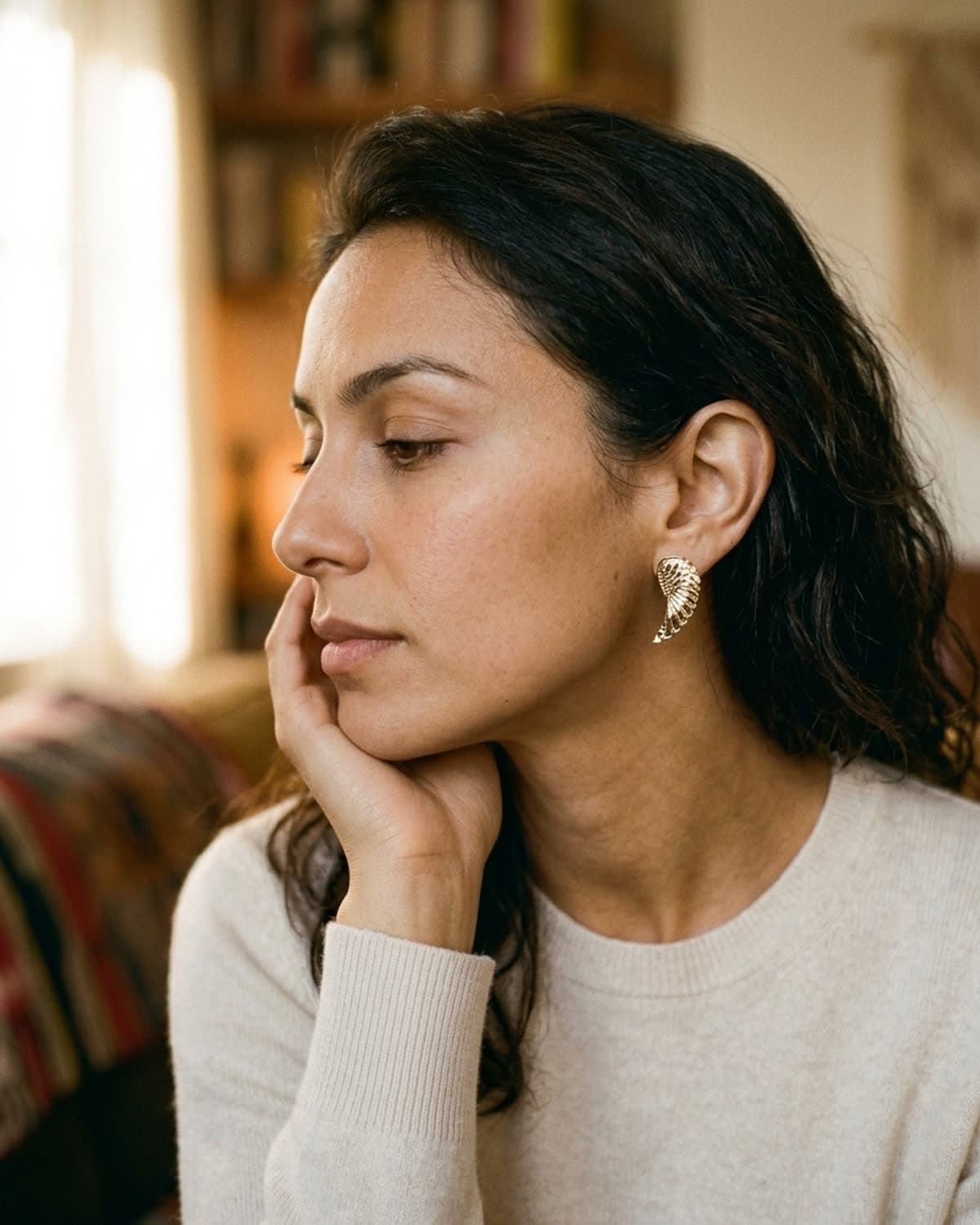
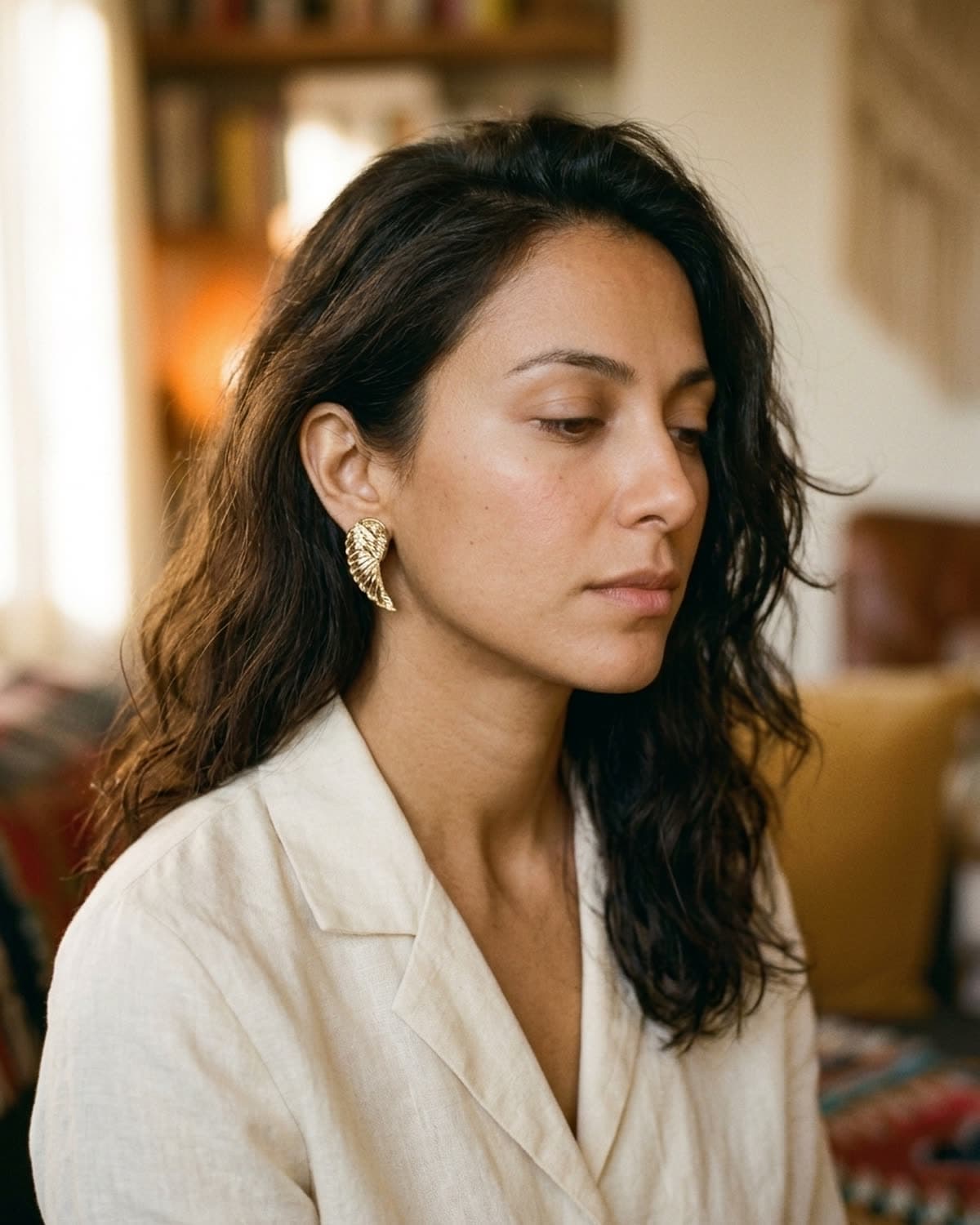
hand-to-jaw is the locked hero crop for most editorial earring photography. the model rests her hand softly at her jawline, palm in toward the face, eyes cast down or away. the hand frames the face naturally and pulls focus to the ear. this is the shot that goes on the etsy hero image and on the instagram feed grid. shoot from soft profile (about 75 degrees off-camera) with the camera roughly at the model's ear height.
three-quarter view (face turned about 30 degrees away from the lens, eyes cast down) works when the earring is large enough to be the obvious subject without the help of a hand frame. statement earrings, drop earrings, large hoops — three-quarter is the right call. the angle shows the front of the earring while still revealing depth.
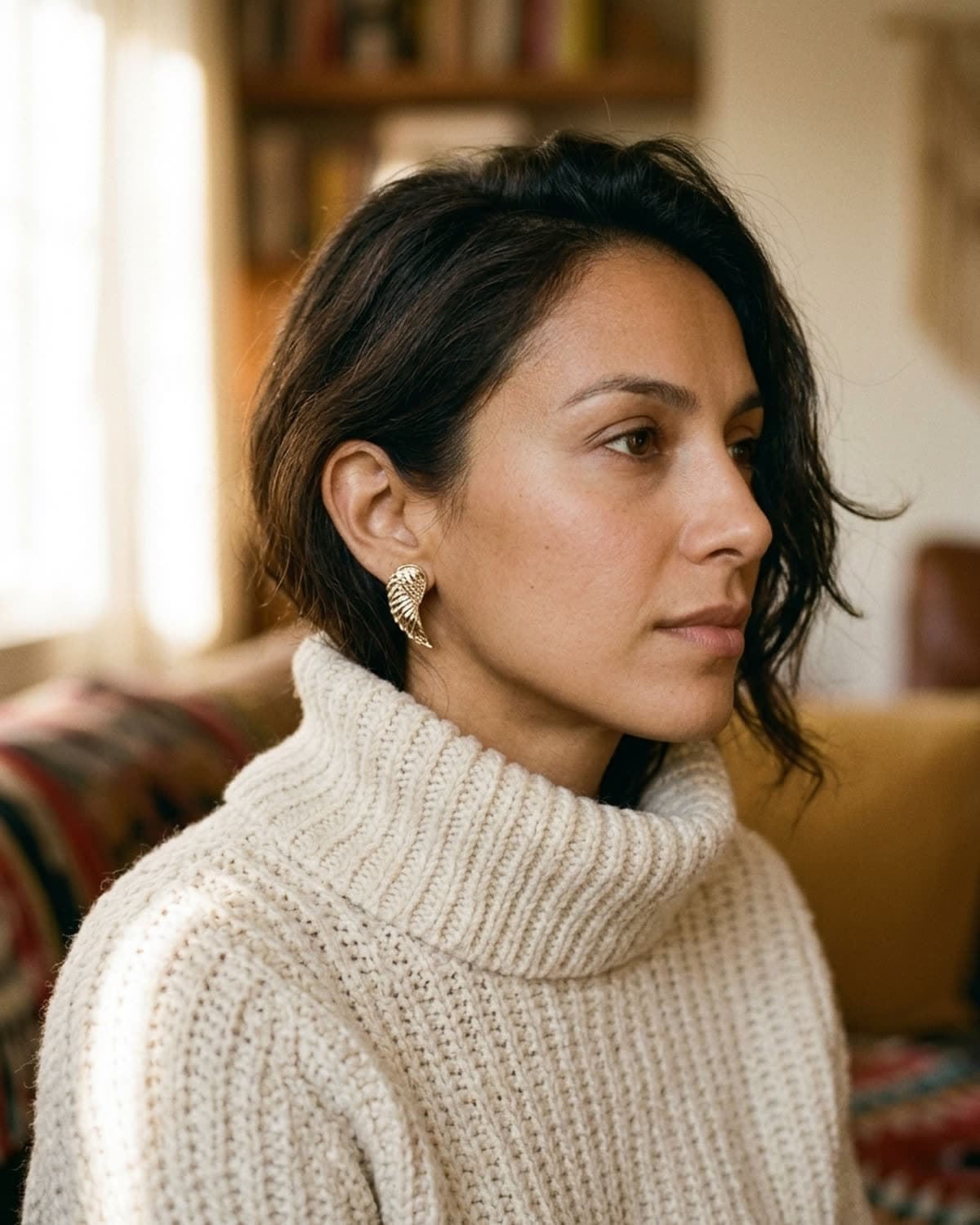
soft profile inside a knit turtleneck or scarf collar is the cozier variant. the chunky knit frames the face from below and the side, and the earring sits inside that frame. this scene works particularly well for fall/winter campaigns and for layered-fine pieces (small studs, huggie hoops, drops under an inch).
avoid the dead-on front-facing portrait. earrings disappear into hair from straight-on, and the symmetry of a front-facing shot makes everything read as ID photo rather than editorial.
the light
direction matters even more than for rings. light coming from the front of the face flattens the ear and kills the dimension on any sculptural earring. light from camera-left (or right — the symmetry doesn't matter as long as it's consistent across your campaign) hits the ear at an angle, creates highlight on one side of the metal, soft shadow on the other, and that gradient is what makes the earring read three-dimensional.
four small adjustments that matter:
- light source above the model's eye line — light from below produces ghoul-lighting; light at eye level produces neutral; light slightly above eye level produces editorial. aim for a window that's slightly above the model's seated head height.
- diffuse direct sun — if the light is direct sunlight (highlights on the face are crisp white, shadows are deep black), pull a sheer curtain across the window. you'll lose maybe half a stop of brightness, gain enormous quality.
- golden hour color temperature — warm light flatters skin, gold metal, and warm-tone backdrops. shoot in the hour after sunrise or before sunset when possible, or fake it with a warm white balance correction.
- catch the back of the ear with bounce — if the ear is in deep shadow, set a piece of white foam-board (or a folded white sheet) on the dark side of the model to bounce a tiny amount of fill light back. only needed for statement earrings where the back of the piece matters.
the lay-flat alternative
not every earring shot needs a model. for etsy product listings specifically, an overhead lay-flat works as well as a model shot — sometimes better, because it lets the customer see the piece's actual proportions without having to mentally adjust for face size.
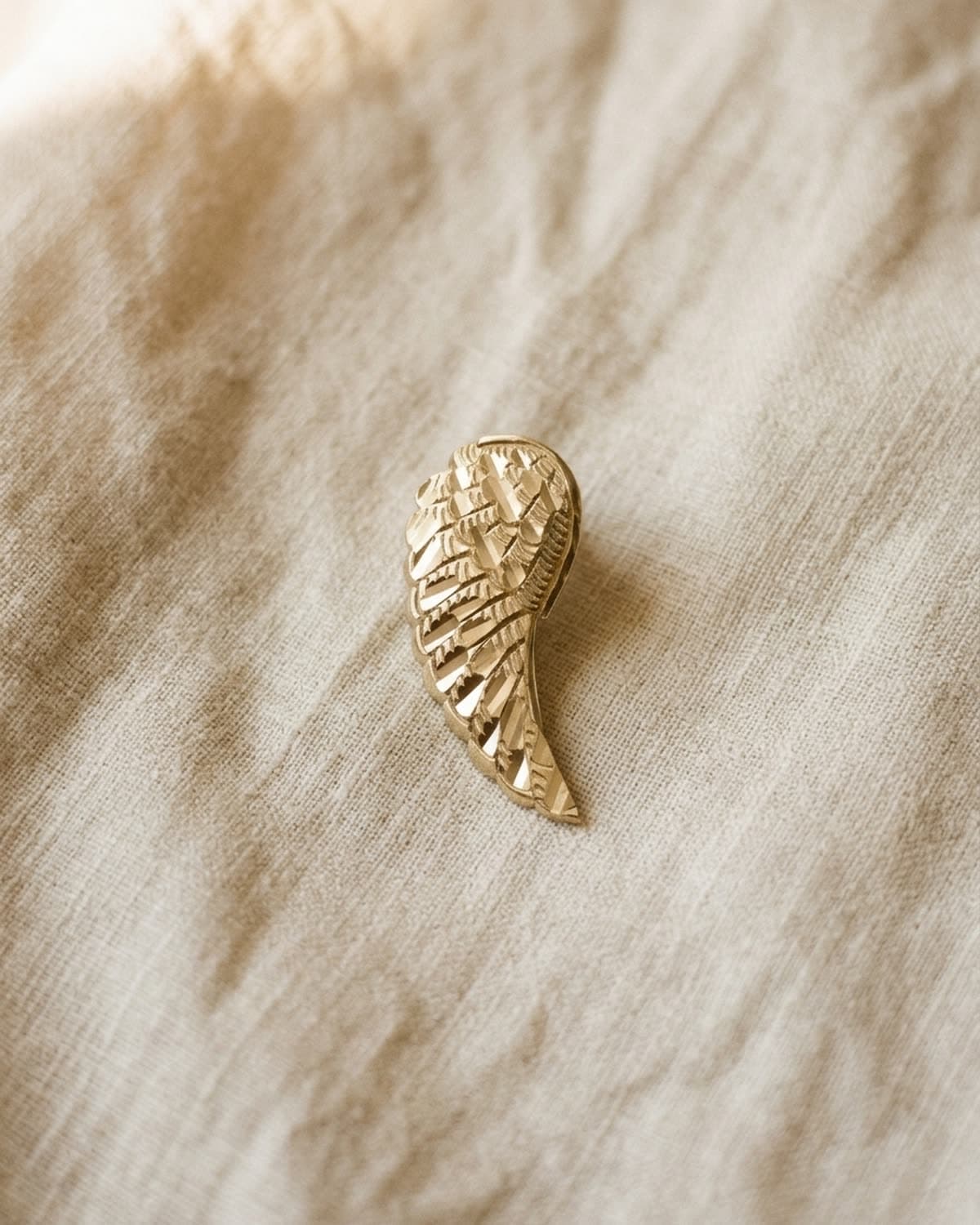
the principles are the same as overhead ring photography: cream linen with subtle natural wrinkles, soft warm window light from upper-left casting a directional shadow, shallow depth of field focused on the piece. the earring sits at the center of the frame; the linen takes up the rest. one specific note for earrings: shoot one earring per frame, not the pair side by side. side-by-side reads as a product catalog. one piece with negative space reads as editorial — and the customer's mind fills in the second earring without effort.
if you're not sure what to lay it on, the backgrounds guide covers the warm surfaces that lift a piece and the dated ones worth retiring.
the focus
iphone earring photography uses the same three-setting setup as iphone ring photography — portrait mode, AE/AF lock by tap-and-hold, slight exposure compensation downward — covered in detail in how to photograph rings without a studio. two earring-specific adjustments worth calling out:
- tap-to-focus on the earring, not the face. portrait mode defaults to face detection, which means the ear is slightly out of focus while the eyes are sharp. tap directly on the earring to override the auto-focus point. the face goes slightly soft; the piece becomes the subject. that's exactly what you want.
- portrait mode minimum distance is real — if your phone shows the “move farther away” warning, step back another foot. the lens needs about ten to twelve inches between camera and subject for portrait mode to engage on objects, and an ear is small enough that you'll often hit the lens minimum if you're close.
focus is the one failure you can't fix later, and it's hard to judge on a phone screen. drop the shot into the photo checker and it scores the focus, the exposure and how much of the frame the piece fills — in your browser, nothing uploaded.
what's working in 2026
the trend in indie earring photography in 2026 is softness, intimacy, and restraint. studio-shot pieces with high-key seamless backgrounds — the dominant aesthetic five years ago — read as dated now. what's working:
- single-light natural setups with one window as the only light source (no fill, no reflectors for most shots)
- warm-toned backdrops — cream knit sweaters, oxblood silk, walnut wood — replacing the cool greys and high-key whites
- off-center compositions with breathing room, even on product listings
- ai-augmented workflows that take an iphone source and polish it to editorial quality without a photographer
if you want the visual proof of all four trends in a single 24-shot grid, the showcase is exactly that — every shot generated from a single iphone source photo, every shot drawn from the same warm palette, every shot using directional natural light.
the shortcut
if you'd rather skip the lighting math, the hair management, and the angle calibration entirely, that's what bling ai does. one upload of a real iphone photo of your earring, one prompt, sixty seconds, polished output ready for etsy or instagram or paid ads. you keep the rights, you can use the output commercially, and you don't have to manage hair.
start creating for free in your browser, or get the iphone app. 100 free credits, no card needed.
or if you want to see the same iphone-to-editorial pipeline applied to other piece types: how to photograph rings without a studio covers the rings case in the same depth, necklaces live or die by how the chain is shaped, bracelets need the wrist or a coil to hold their curve, and 5 mistakes that make ai jewelry photos look fake covers what to prompt around when the ai outputs come out wrong.